Greta BartkuteProduct designer

Case study 02 · Fashion Cloud · B2B replenishment

From fragmented tools to a shared vision for Smart Replenishment

How I aligned the team around a product direction, turned it into a phased roadmap, and designed the first workflows to bring recurring recommendations out of spreadsheets and into the product.

Role
Lead product designer
Team
PM, PO, PSMs, Data Science, Engineering
Timeline
March to October 2026
Status
Vision aligned internally and validated with brands.
Phase 1 in development, Phase 2 in discovery.
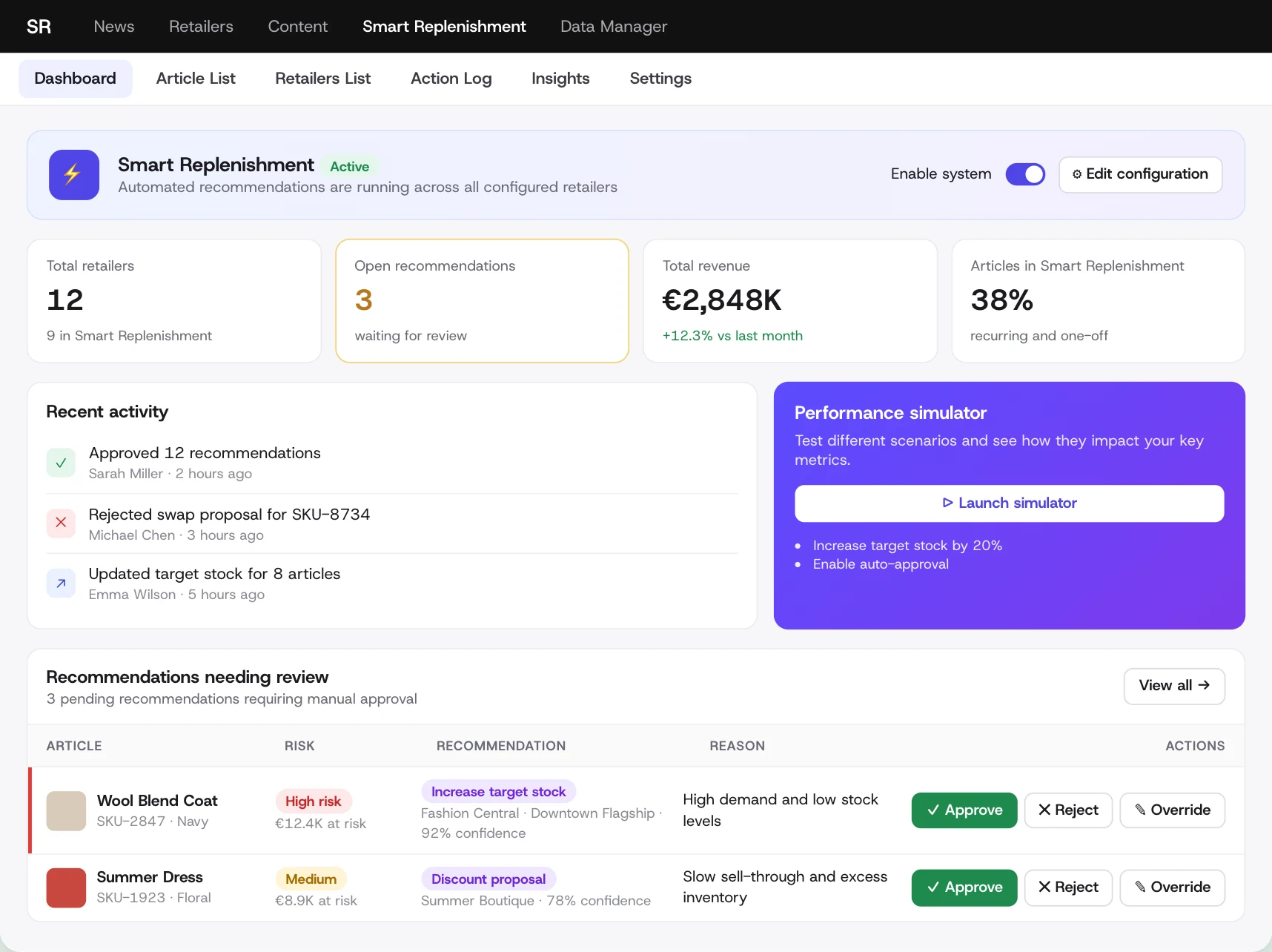
North Star vision · prototype
North Star cockpit: KPIs, recent activity, a simulator and recommendations with a reason and approve, reject or override

Where it's going: one cockpit for every recommendation.
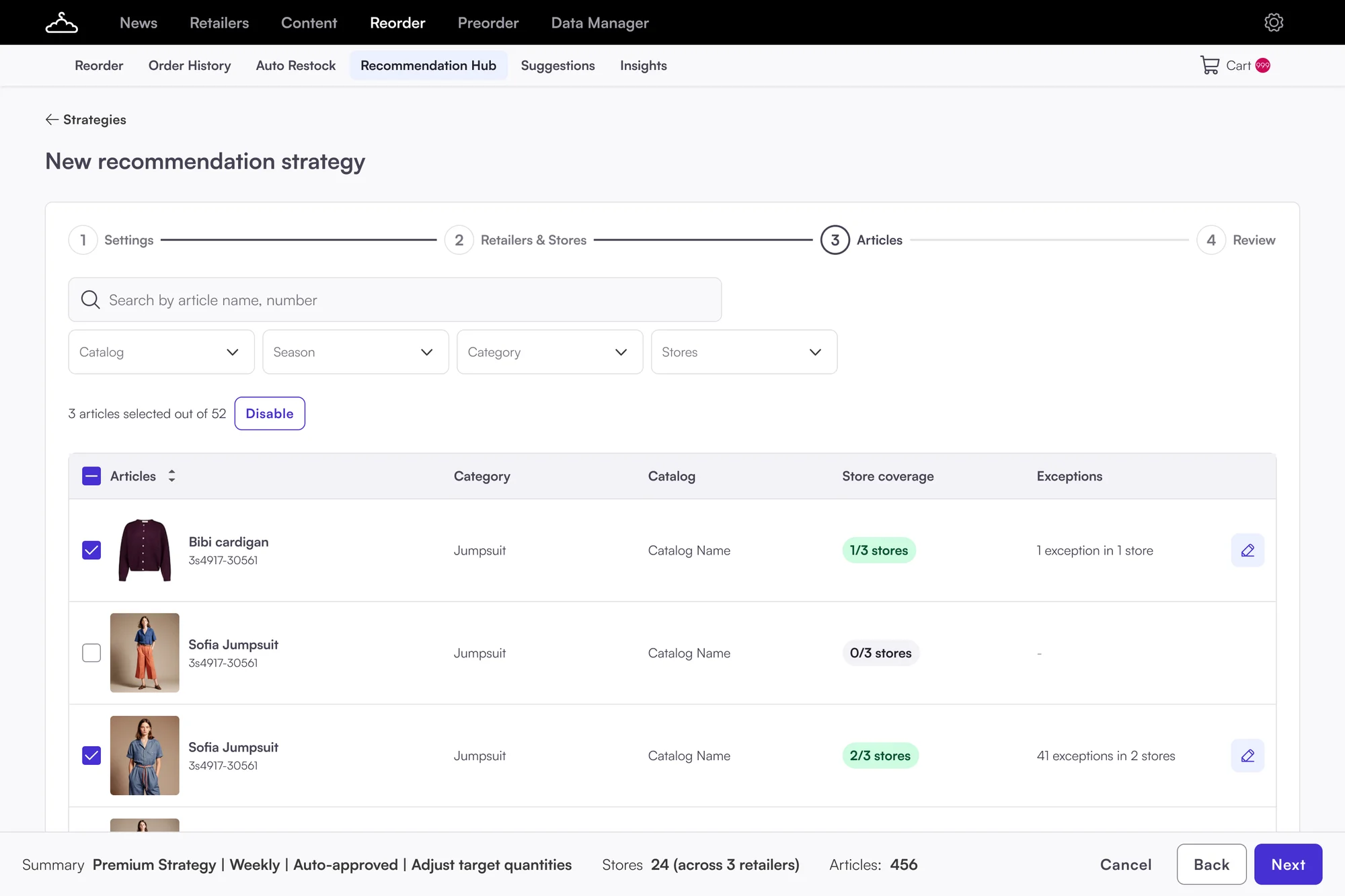
Phase 1 · final design
Phase 1 final design: new recommendation strategy, articles step with store coverage and exceptions

What we're building first: brands set up their own strategies.

Outcome

A North Star the team and brands agreed on, a roadmap in six phases, and a first release that moves recommendation setup out of spreadsheets and into the product.

1

North Star vision, validated with brands and PSMs

6

Roadmap phases, each useful on its own

Less manual work

Moving recommendation setup from PSMs to brands through self-service

About the project

I led discovery to get everyone aligned on what Smart Replenishment should become.

I turned that direction into a North Star prototype and a phased roadmap, starting with self-service setup for recurring recommendations, followed by recommendation review in the product. The scope changed along the way. My job was to keep the bigger picture in view while working out what we could realistically build first.

My role
  • Led discovery and the workshop with Product, Data Science, Engineering and PSMs
  • Designed the North Star prototype, built with AI and tested with brands and PSMs
  • Phased roadmap with the PM and PO
  • The UX and UI for Phase 1: recommendation setup
  • Worked with the PM, PO, PSMs, Data Science and Engineering
01 · The problem

Three problems, all connected

  1. No shared directionEveryone meant something different by "smart".
  2. Three tools, no single viewReorder, Suggestions and Auto Restock. Nothing showed what needed attention.
  3. The smartest feature lived outside the productThousands of numbers, no reasons. Every run needed a PSM.
Part 1 · The vision

Creating direction

02 · Discovery

One shared picture

A workshop to agree on one definition of "smart".

Workshop

Discovery workshop

Product, Data Science, Engineering, PSMs

Step 1Agree on the problemOne priority, one North Star
Step 2Essential vs nice-to-haveFour jobs to be done
Step 3Make it concreteOne entry point, reasons, setup by type
From step 1

Six themes, then a vote

UX/UI issuesData and transparencyVoted topFunctionality and usabilityTrust and reliabilitySupport and change managementBasics and innovation
What we optimise forData and transparency, for better trust
From step 1

North Star

Merged from everyone's "what is smart?"

  1. 1Surface what matters
  2. 2Explain why
  3. 3Automate what it can
From step 2

Four jobs to be done

Job 1Start from the right contextRetailer-first or article-first
Job 2Act without switching toolsAct where the recommendation appears
Job 3 · top priorityUnderstand the reasoningSee why, so I can trust it
Job 4Let the system handle what's safeAutomate the routine, flag exceptions
03 · The vision

What changes for Lena

From three tools with no reasons to one place that says what to do.

Lena's week

Too many tools and too much manual work
Step 00Lands on Reorder"I don't know what's important or what to do next"Lost
Step 01Set up Auto Restock"I don't know what target stock to set, or when to stop replenishment"Unsure
Step 02Manage in season"I can't do bulk actions across retailers. I don't see the backlog"No overview
Step 03Add new articles"I add everything manually, article by article"Annoyed
Step 04Manage one-off suggestions"I don't know how the algorithm works. Retailers miss the emails"Doesn't trust it
Step 05Check performance"Lots of data, but no idea what to do with it"Overwhelmed
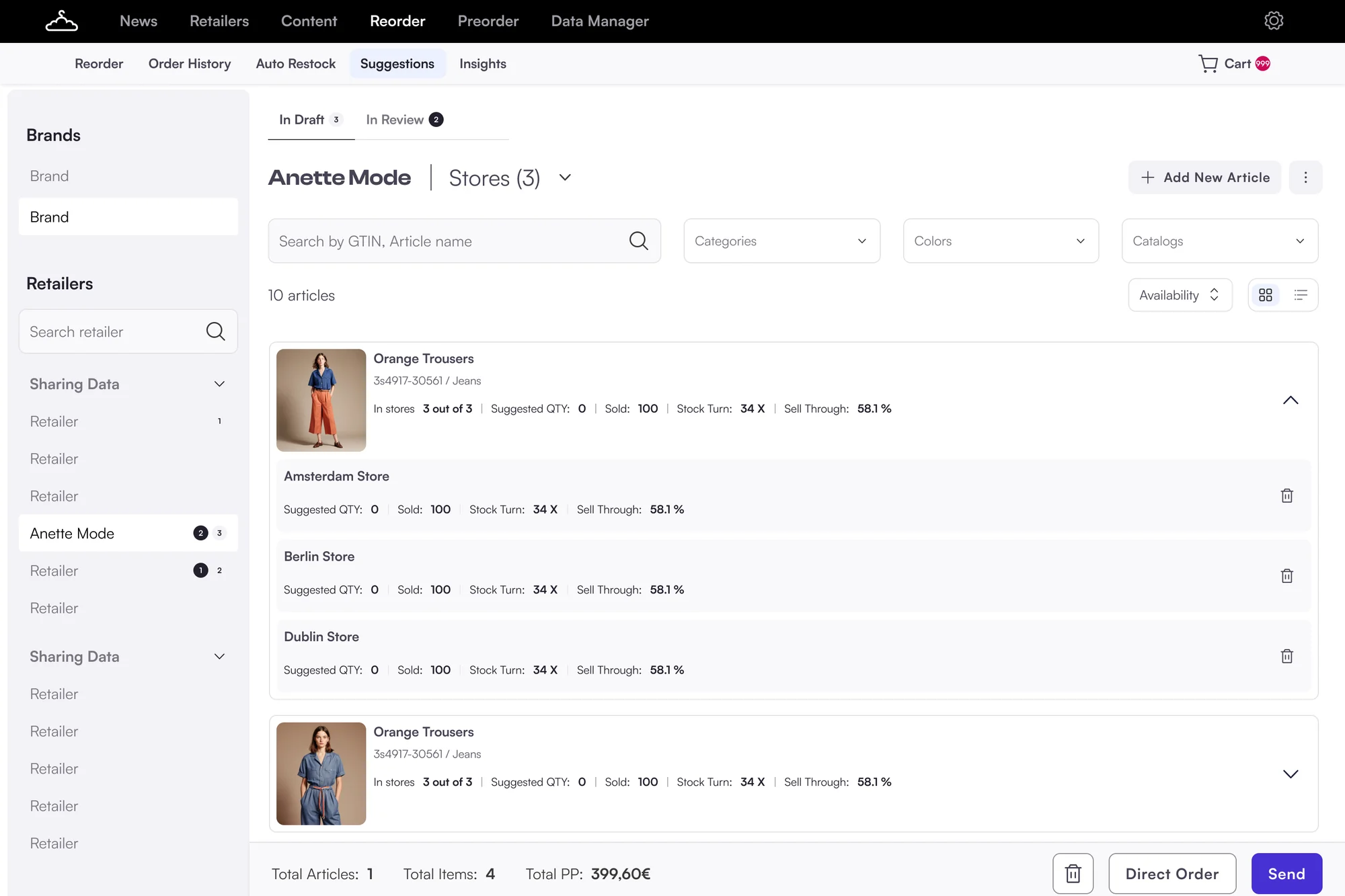
Suggestions page: one-off recommendations without a reason
SuggestionsNo reasons
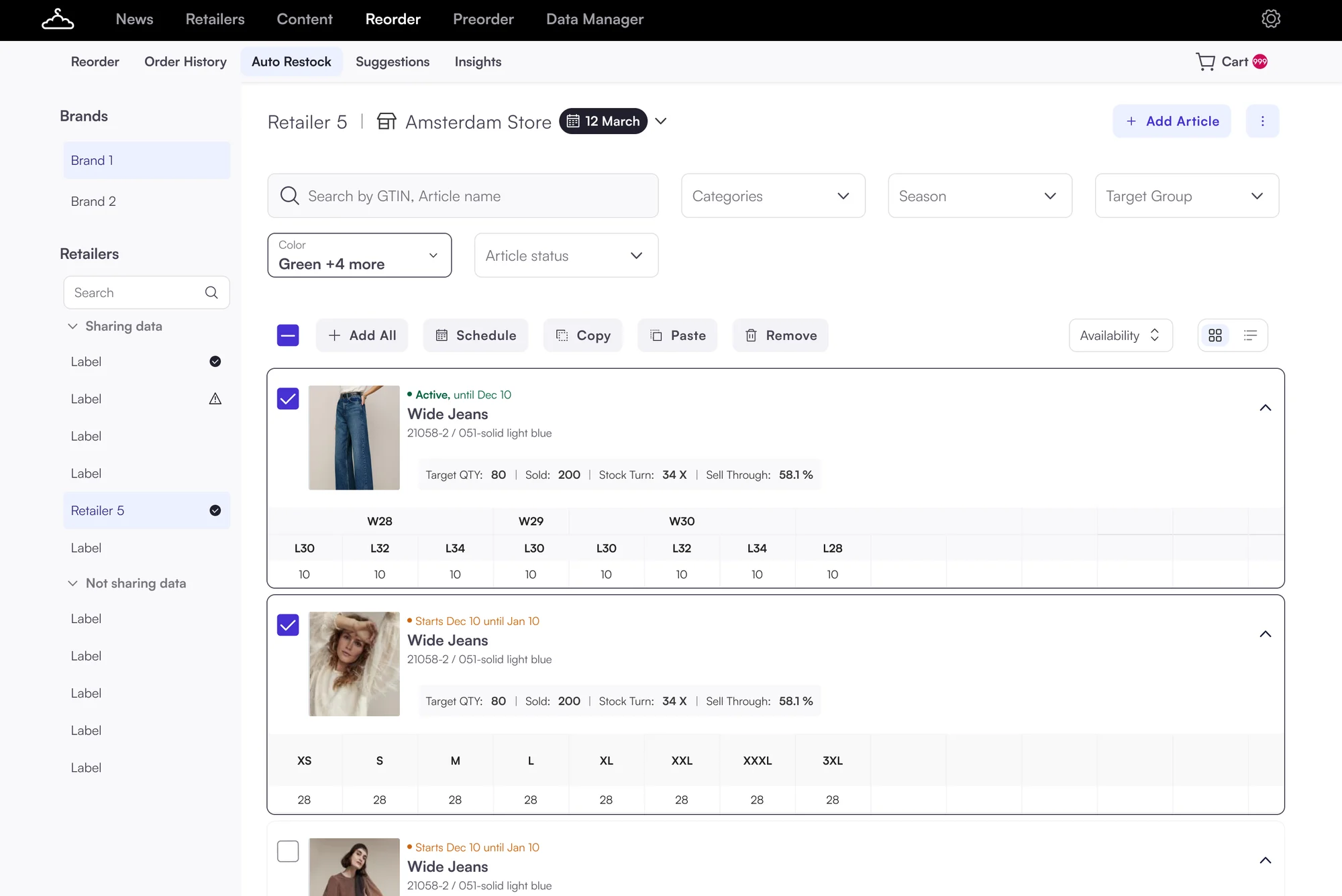
Auto Restock page: retailer by retailer, store by store, with size grids
Auto RestockRetailer by retailer
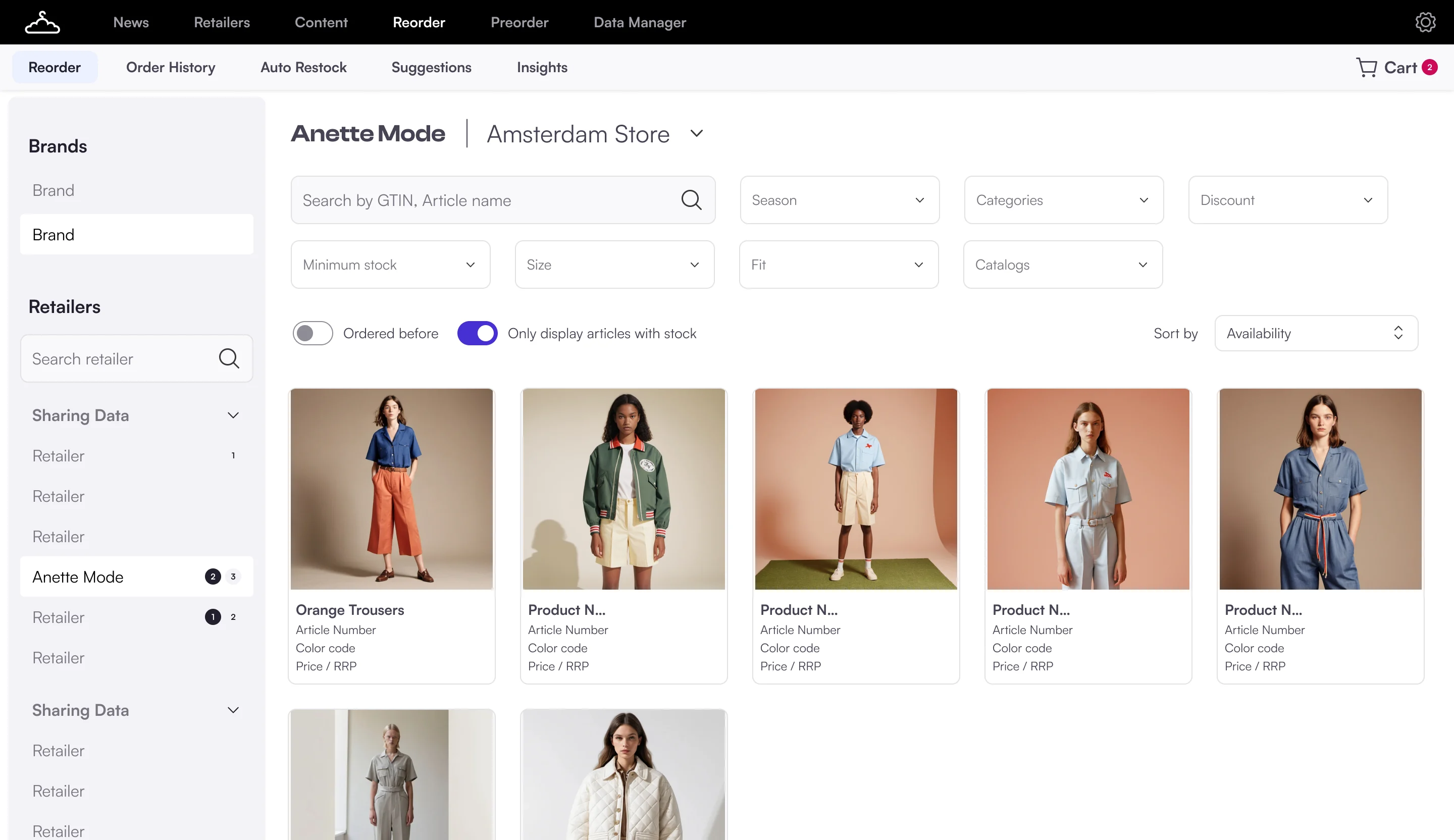
Reorder page, the landing page of the order area
ReorderDefault page, no to-dos

One place where she sees what to do

Step 01Lands in the cockpitSeparate toolsOne place for Auto Restock, Suggestions and B2BClear start
Step 02Sees what mattersSearching for problemsA clear list of to-dosHas overview
Step 03Reviews recommendationsBlack boxEach recommendation explains whyTrusts it
Step 04Takes actionStore by storeBulk actions, and the system learns from her feedbackSaves time
Step 05Explores and plansData without guidanceSimulator, Insights and AI agent help her decideIn control
With the cockpitToday
04 · North Star

One connected cockpit

Every recommendation in one place, each with a reason. A clickable prototype I built with AI.

Prototype

Try the North Star prototype

Click the tabs. The simulator works.

North Star prototype · Smart Replenishment
SRNewsRetailersContentSmart ReplenishmentData Manager
⚡
Smart Replenishment ActiveAutomated recommendations are running across all configured retailers
Enable system ⚙ Edit configuration
Total retailers129 in Smart Replenishment
Open recommendations3waiting for review
Total revenue€2,848K+12.3% vs last month
Articles in Smart Replenishment38%recurring and one-off
Recent activity
✓
Approved 12 recommendationsSarah Miller · 2 hours ago
✕
Rejected swap proposal for SKU-8734Michael Chen · 3 hours ago
↗
Updated target stock for 8 articlesEmma Wilson · 5 hours ago
Performance simulatorTest different scenarios and see how they impact your key metrics.▷ Launch simulator
  • Increase target stock by 20%
  • Enable auto-approval
Recommendations needing review3 pending recommendations requiring manual approval
View all →
ArticleRiskRecommendationReasonActions
Wool Blend CoatSKU-2847 · NavyHigh risk€12.4K at riskIncrease target stockFashion Central · Downtown Flagship · 92% confidenceHigh demand and low stock levels✓ Approve✕ Reject✎ Override
Summer DressSKU-1923 · FloralMedium€8.9K at riskDiscount proposalSummer Boutique · 78% confidenceSlow sell-through and excess inventory✓ Approve✕ Reject✎ Override
Performance simulatorTest different scenarios and see how they impact your key metricsNothing is applied until you save
Scenario
Auto-approvalApply low-risk recommendations at the deadline
Recommendation types
External bestsellers
Discount proposal
Increase target stock
SwapReallocate stock between stores
Open recommendations24 
Articles at risk12 
Revenue potential€48K 
Stock health87% 
Sample recommendations based on this scenario
Article managementMonitor performance and manage auto-replenishment✦ AI insights
Total articles8
In auto replenishment87 active · 1 paused
Needs action3pending recommendations
Critical stock1articles at risk
Revenue at risk€21Kpotential loss
Needs action (3)In auto replenishment (8)All articles (8)
Search articles…Category: All ▾Retailer: All ▾Risk: All ▾
ArticleChangeRiskRecommendationReasonActions
Wool Blend CoatSKU-2847150 → 180Current: 89High riskIncrease target stockFashion Central · 92% confidenceHigh demand and low stock levels✓ Approve✕ Reject✎ Override
Summer DressSKU-1923€89.99 → €59.99MediumDiscount proposalSummer Boutique · 78% confidenceSlow sell-through and excess inventory✓ Approve✕ Reject✎ Override
Running ShoesSKU-7722—Low risk——✓ Approve✕ Reject✎ Override
Retailers15 retailers ▾
Total retailers1514 active · 1 inactive
Auto Restock articles221
Open recommendations308
Articles at risk24
Search retailers…
RetailerStoresAuto replenishmentOpen recsRiskActions
ZZalando12 stores8/12 active824Medium risk⚙ SettingsView articles →
AYAbout You8 stores5/8 active518Low risk⚙ SettingsView articles →
ASASOS6 stores6/6 active615Low risk⚙ SettingsView articles →
Action logTrack all recommendation actions and decisions↻ Refresh⤓ Export
Total actions3
Accepted2
Declined1
Stock changes1
Discounts1
Swaps0
Search by retailer, store, article…⏷ Filters
ActionArticle · retailerReasonBy
AcceptedTarget stock 150 → 180Wool Blend CoatFashion Central · Downtown FlagshipHigh demand and low stock levelsSarah Miller2 hours ago↶ Undo
AcceptedDiscount €89.99 → €59.99Summer DressSummer BoutiqueSlow sell-through and excess inventorySarah Miller2 hours ago↶ Undo
DeclinedSwap proposalSKU-8734ZalandoOverride: store layout changes next weekMichael Chen3 hours ago↶ Undo
Recommendation setupConfigure automation rules and schedules
Main setupAdvancedSimulator
Recommendation types3 of 5 enabledOne-offRecurring
External bestsellersIdentify trending articles from market data
Control level: ● Manual review○ Automatic
SwapReallocate stock between articles or stores
Discount proposal AutoSuggest optimal discount levels for slow-moving inventory
Control level: ○ Manual review● Automatic
Impact preview
Open24
At risk12
Revenue€48K
Health87%
6 of 10 recommendations enabledCancelSave and apply

    Dashboard

  1. 1
    What needs attention, at a glanceWhyLena had to look for problems herself, with no alerts.
  2. 2
    Every recommendation explains whyWhyData transparency and trust won the vote. "Black box" was the top worry.
  3. 3
    Accept, decline or override in placeWhyJob 2: act without switching tools. Today decisions happened in Excel.
  4. 4
    A simulatorWhy"Simulation and what-if scenarios" was one of the biggest wows in concept feedback.
  5. 5
    Recent activityWhyBrands asked to see who changed what, and when.

    What-if simulator

  1. 1
    Change the scenarioWhyBrands want everyday restocking automated, but control over big decisions.
  2. 2
    See the impact before applyingWhyThe team asked for quick simulations of impact and major risks.
  3. 3
    Real examples, with the reasonWhyTrust through transparency: no number without a reason.

    Article list

  1. 1
    Article-first viewWhyThe strongest signal in research.
  2. 2
    The change, before and afterWhyIn the sheet, brands only saw raw numbers with no context.
  3. 3
    Filter by retailer and riskWhy"Too much manual work. Everything is store by store."

    Retailer list

  1. 1
    Retailer-first, for sales repsWhyLena: "I want to see which retailers need my attention and why."
  2. 2
    Risk per retailerWhyShows where to look first, so nobody has to dig.
  3. 3
    Settings per retailerWhyToday a PSM keeps these rules in a Google Sheet.

    Action log

  1. 1
    Every decision recordedWhyBrands asked for an action log. It moved up our roadmap.
  2. 2
    The reason travels with itWhyOverride reasons feed back into better recommendations.
  3. 3
    UndoWhyA top fear about automation: not being able to cancel an incorrect order.

    Setup

  1. 1
    Setup by recommendation typeWhyEvery blind sketch in discovery had setup by recommendation type.
  2. 2
    Manual review or automaticWhyScope of automation: the line between "system decides" and "user approves".
  3. 3
    Impact previewWhyPeople trust automation more when they see what will change.
How the concept took shape Map, two rounds of wireframes, blind sketches, three rounds of design

How the concept took shape

Main dashboardMain KPIsRecommendation list: accept, decline, overrideAction log: date, action, reason, undo
Article listFilters: retailers, stores, assortmentBulk actions: remove, addTarget quantity changes
Article detailPerformance across retailers and storesSize matrix with target quantityWhat to do with this article, and whyPlace a one-off order
Recommendation setupOne-off: bestsellers, swap, discountRecurring: raise or lower target stock, stop, pauseRules: stock and budget limits, data sourcesManual or automatic, per type
MVP conceptCockpit dashboardProposals list, reviewed by handAction list: automatic and user changesSetup as its own page
Map

Every page, every job

Before drawing anything, I mapped what each page had to do.
DecidedThe MVP concept: a cockpit dashboard, a proposals list for manual review, an action list for automatic changes, and setup as its own page.
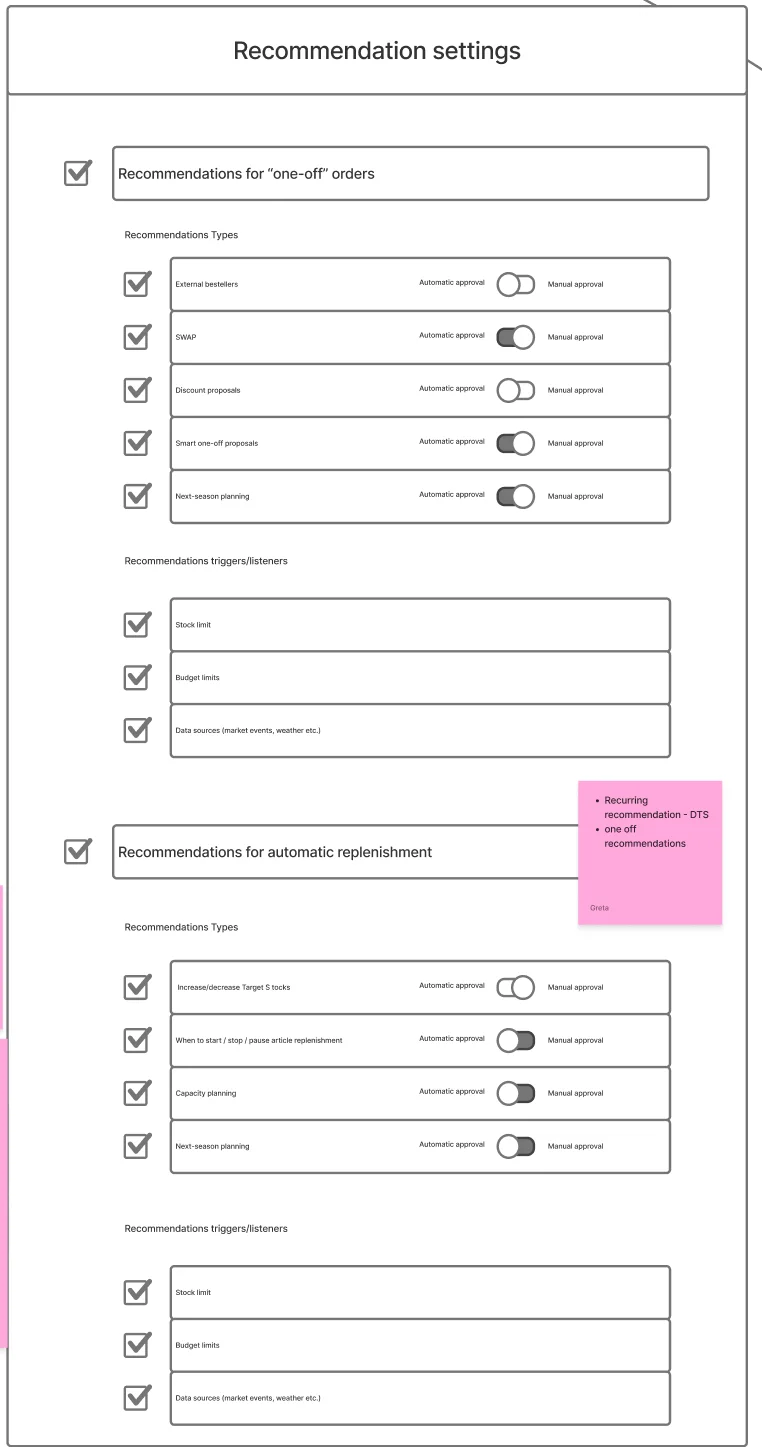
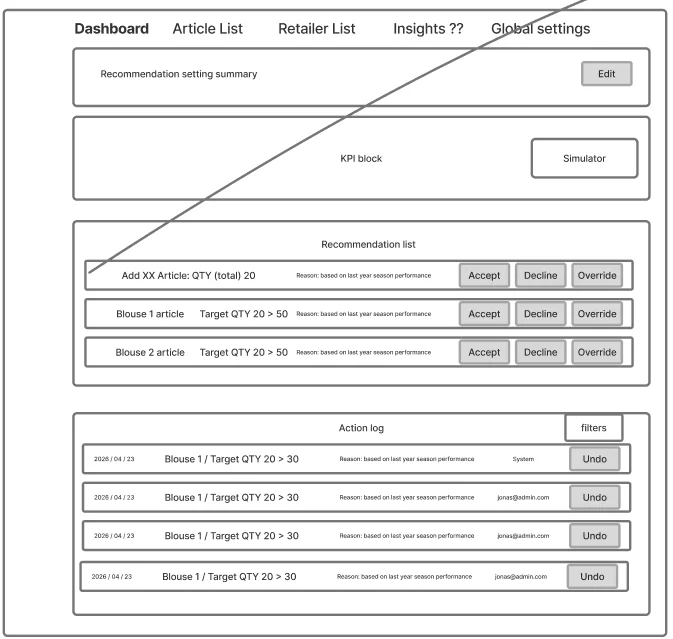
Round 1 wireframe: dashboard with KPI block, simulator, recommendation list with accept, decline, override, and an action log with undoRound 1 wireframe: recommendation settings, one-off and automatic, each type with automatic or manual approval
Round 1

Wireframes to test the structure

Grey on purpose, so the team judged structure, not colour.
Scoped inExplanations everywhere. Override feedback. Article-first bulk actions.
Kept simpleThe simulator as a button only for now. Global settings as a placeholder. A size matrix that doesn't get overcomplicated.
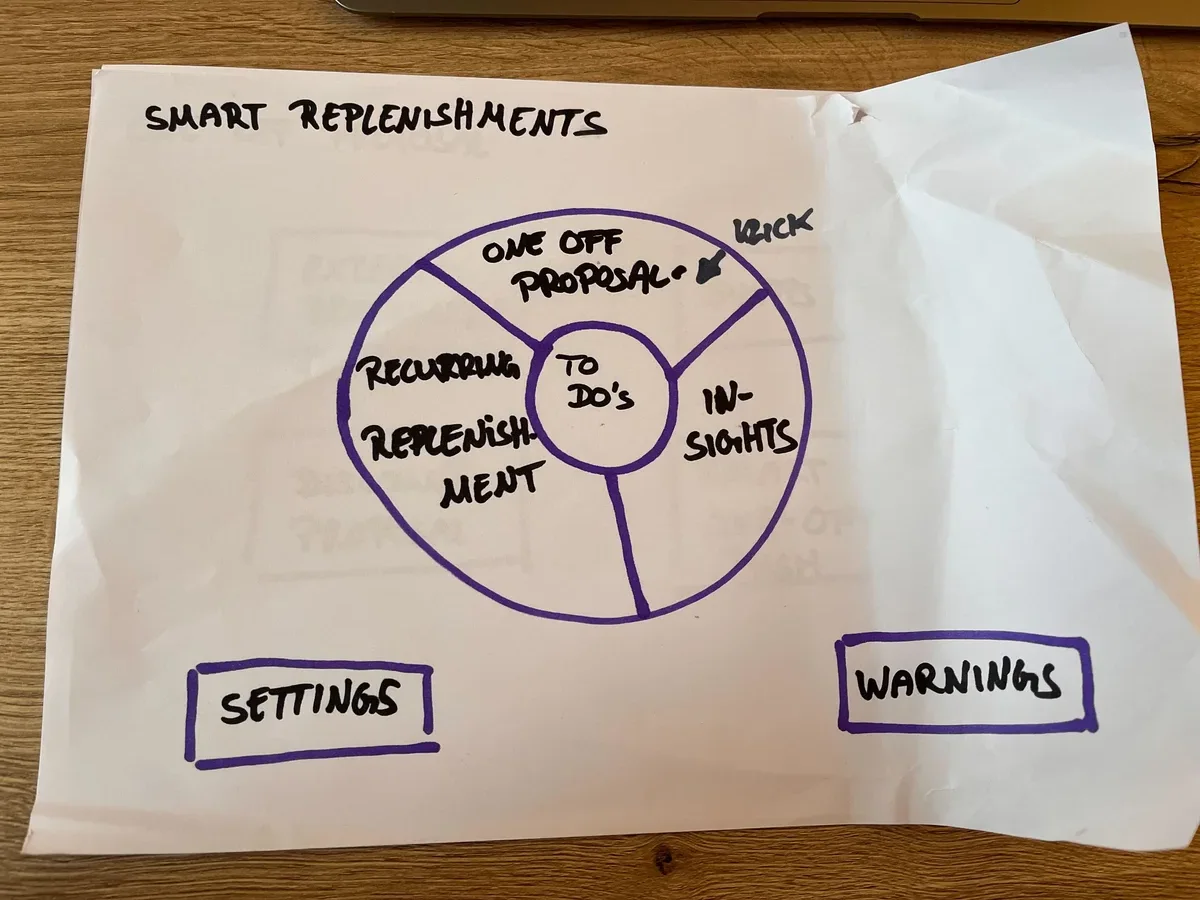
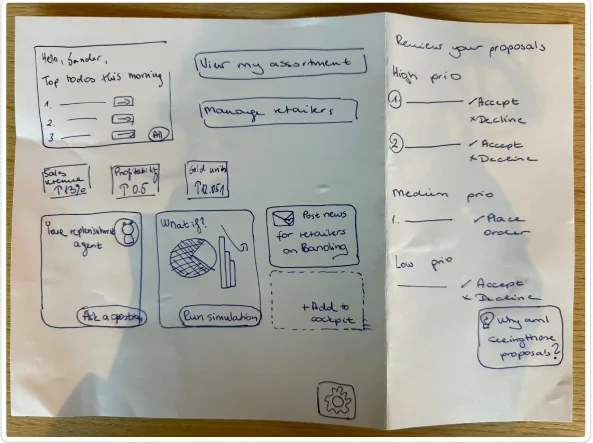
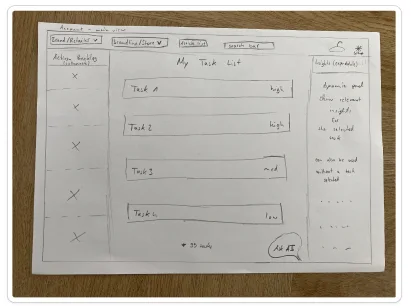
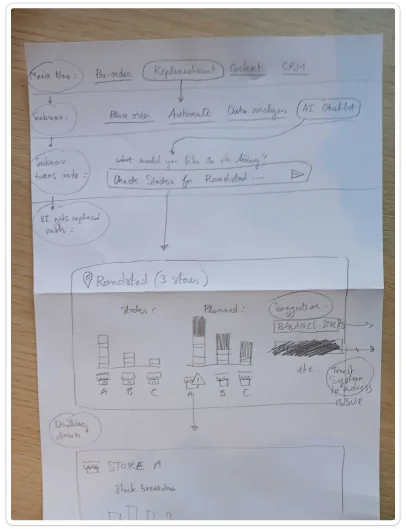
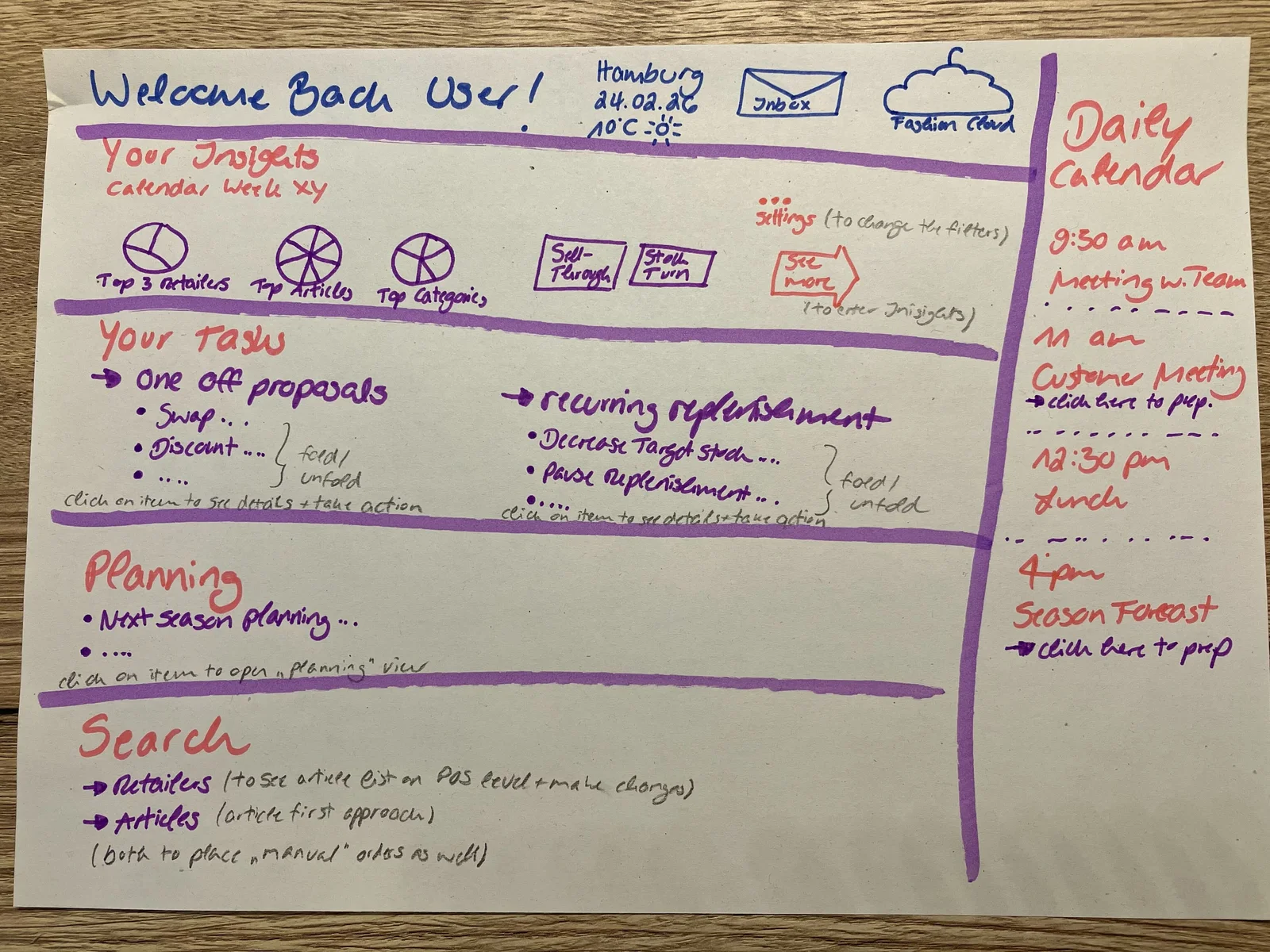
Team sketch: welcome back, your insights, your tasks split into one-off proposals and recurring replenishment, planning, searchTeam sketch: a smart replenishment wheel with to-dos at the centre, one-off proposals, recurring replenishment and insightsTeam sketch: dashboard with proposals and actionsTeam sketch: list with filtersTeam sketch: overview and article view
Sketches

Blind sketches from the team

I asked the PO, PSMs and the team to sketch their own cockpit without seeing mine.
Shared by almost allOne entry point. To-dos first, split into one-off and recurring. A reason next to each recommendation. Setup by recommendation type.
So whatMy concept hadn't missed anything the team cared about.
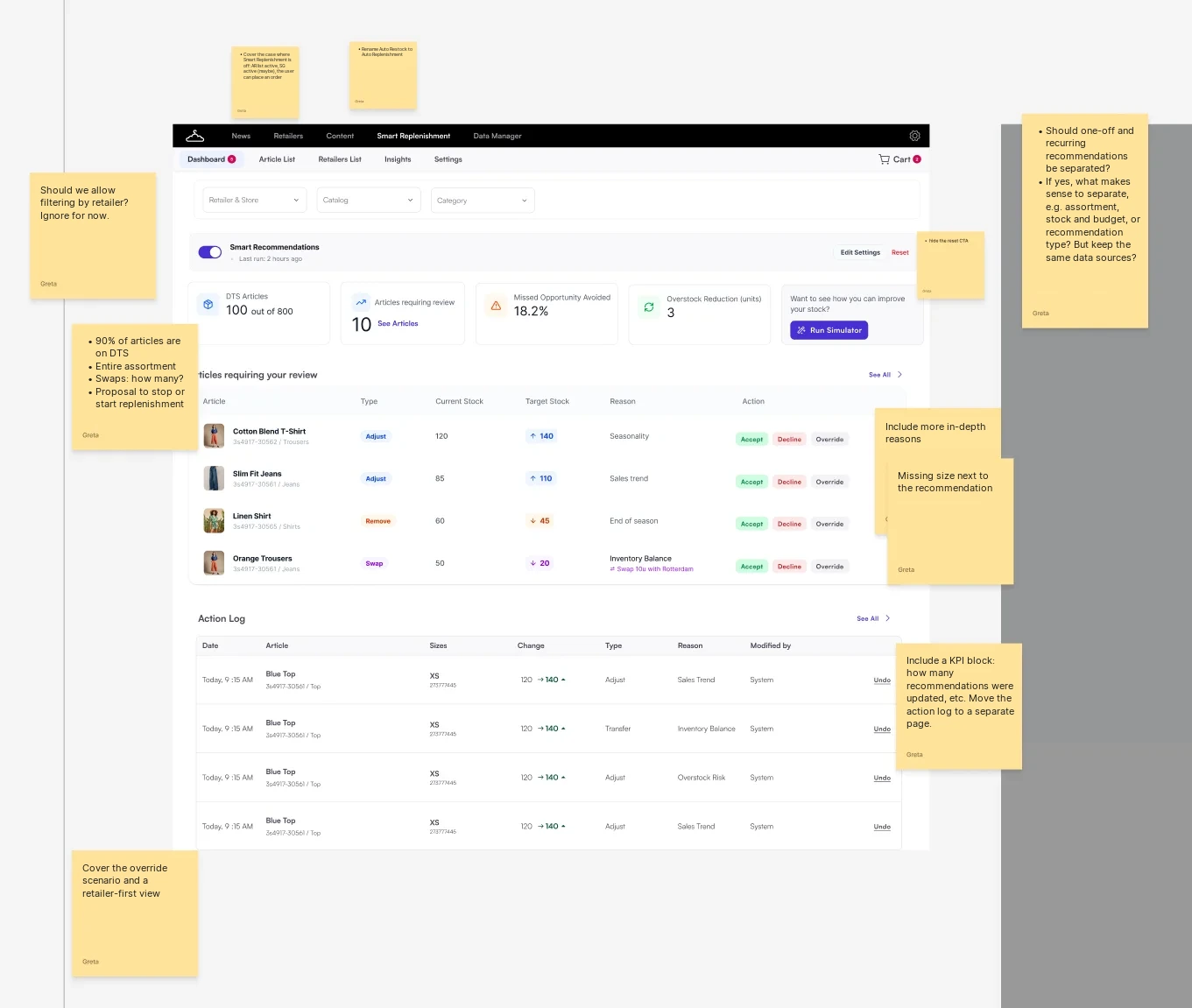
Round 2 dashboard with review notes: include more in-depth reasons, missing size next to the recommendation, a KPI block on how many were updated, cover the override scenario and a retailer-first view
Round 2

First hi-fi, reviewed against the jobs

I reviewed the first full-colour cockpit against the four jobs.
MissingReasons were too thin ("Seasonality"). No size next to the recommendation. No override or retailer-first view.
Open questionShould one-off and recurring recommendations be separated, if they use the same data?
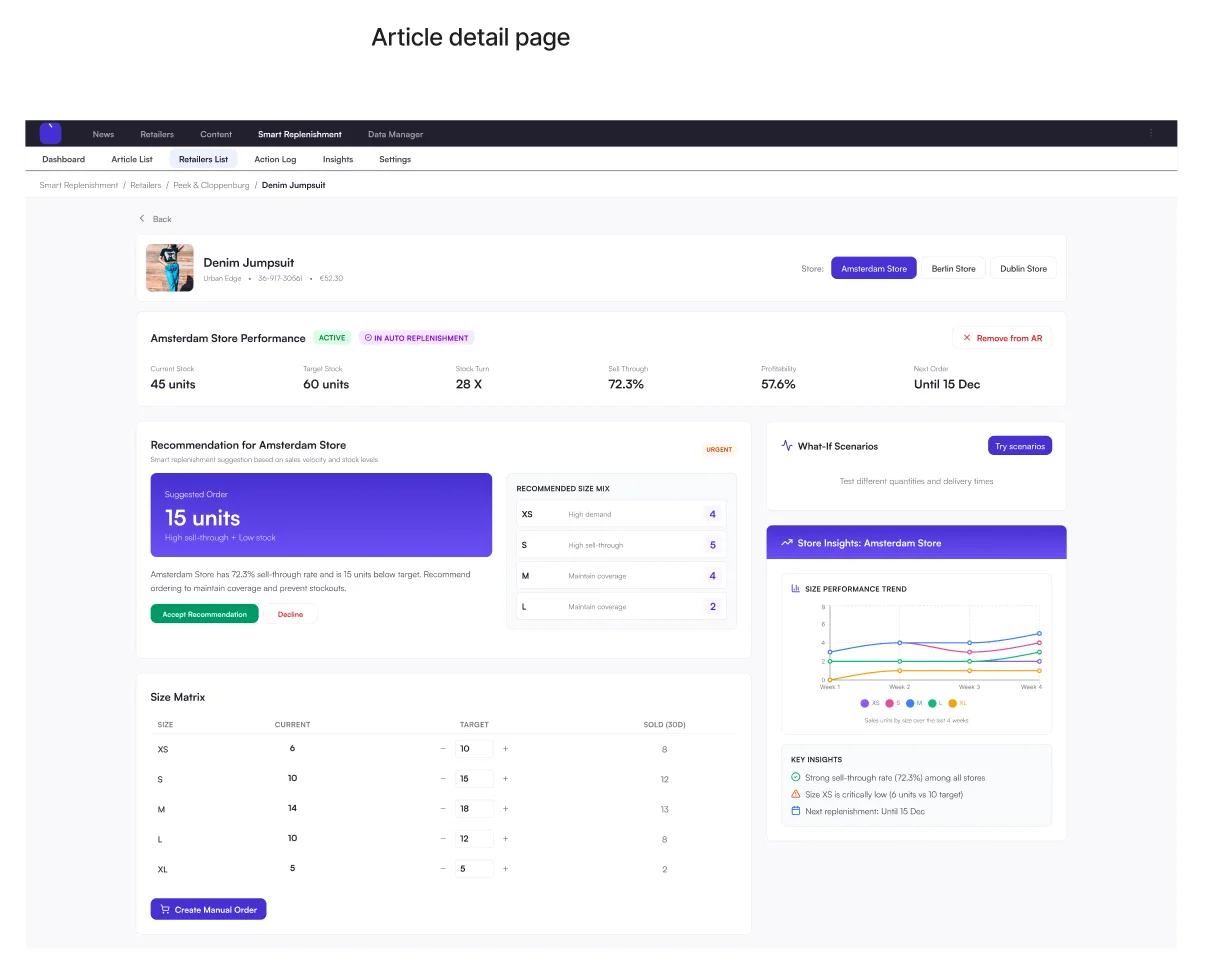
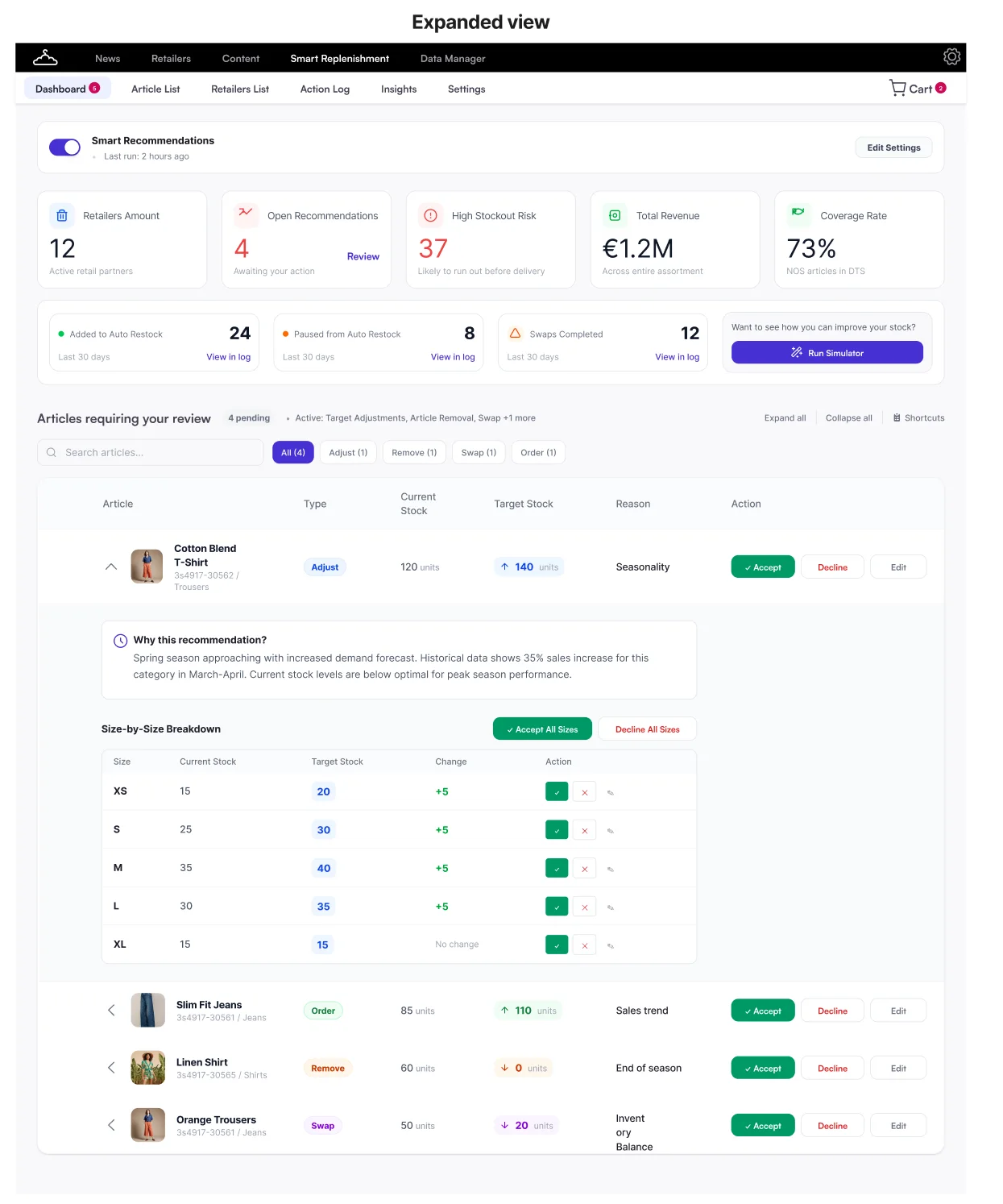
Round 3 expanded view: why this recommendation, in plain language, and a size-by-size breakdown with accept all sizesRound 3 article detail page: recommendation for one store, recommended size mix, size matrix and what-if scenarios
Round 3

The answer to "why?"

Each recommendation opens into a plain-language "Why this recommendation?" and a size-by-size breakdown.

FeedbackKPIs now lead with what needs action, not "active retailers".
NextThis became the clickable North Star prototype below.
05 · Validation

Can we build it, and do brands want it?

Engineering and data science, then PSMs and brands.

Engineering and data science

Is it feasible?

  1. Data availabilityPartly thereQuality varies by brand and retailer.
  2. Recommendation logicFeasibleHigh-volume, low-complexity decisions can follow a brand's rules.
  3. PlatformBuildable, with limitsToo many settings become a black box.
  4. ExplainabilityMust haveEvery "wow" about automation came with a worry.
Brands and PSMs

What users said

What people liked most

Article-first

One overview of what needs attention

What was missing

Action log moved up our roadmap

Notifications added to the Platform roadmap

06 · Roadmap

Six phases, each useful on its own

With the PM and PO, I split the cockpit into phases that each work on their own.

In developmentIn discoveryLater
  1. 1In developmentSetupBrands set their own rules
  2. 2In discoveryReviewAccept, decline, override
  3. 3LaterExplainabilityA reason for every one
  4. 4LaterOne homeOne entry point
  5. 5LaterAdvanced decision supportPrediction and what-if
  6. 6LaterArticle firstOne article, all retailers
Part 2 · Roadmap phase 1 of 6

Delivering the foundation

07 · Phase 1: Setup

Setting up recommendations

Goal

Brands set up their own recommendations. No ticket, no sheet.

The hard part

Requirements and scope kept changing as new stakeholders joined. I adjusted, and pushed back on what should come later.

Before Phase 1

Where it started

  1. 1BrandWants a rule changedCan't change it on their own
  2. 2PSMChecks the rules, raises a ticket1 to 2 h per brand, per run
  3. 3Google SheetRules copied in by handRules live outside the product
  4. 4Data scienceRuns the scriptEvery run needs a hand-off
At 20 brands
20 to 40 hPSM time per week
0.5 to 1full-time PSMs, just copying rules
Decision 1

Give recommendations their own home

The plan was to add them to Auto Restock. I pushed back: the page was already dense.
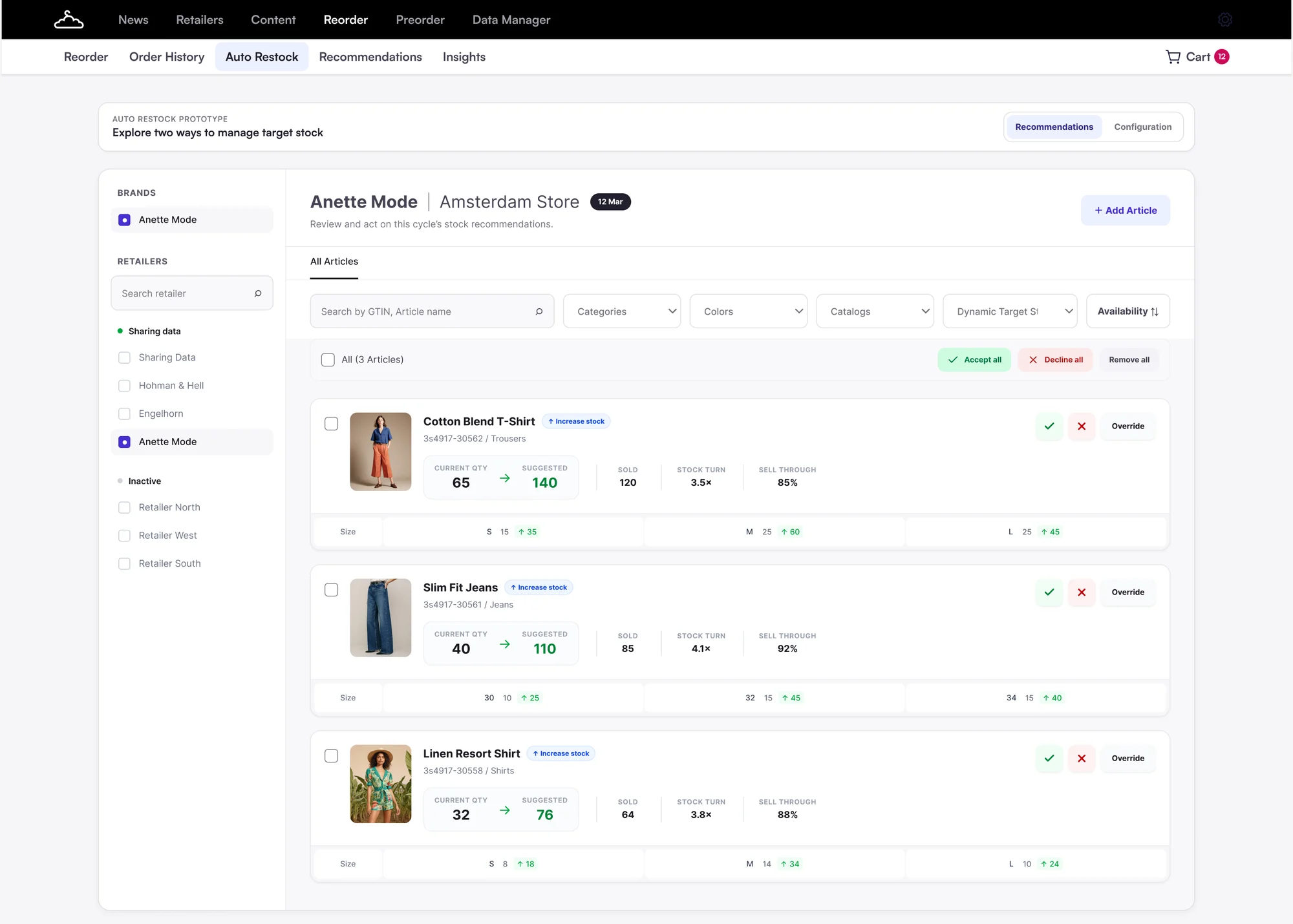
Considered
Recommendations inside the Auto Restock page: one retailer and store at a time, with suggested quantities and accept, decline, override on every article card1234
Recommendations inside Auto Restock
  1. Hidden inside Auto Restock.
  2. One retailer and store at a time.
  3. A big new job on an already busy page.
  4. Dynamic Target Stock articles behind a filter.
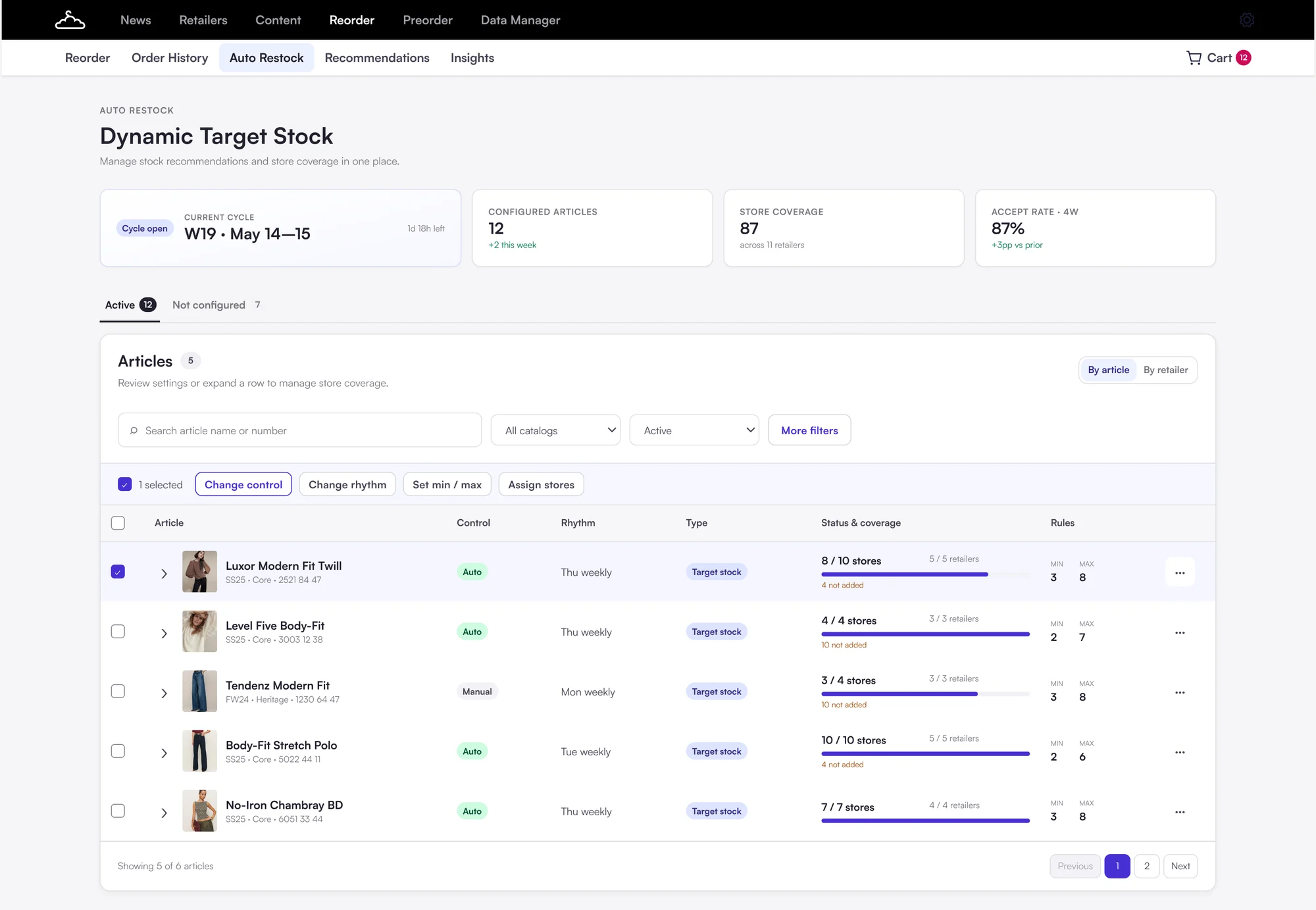
Chosen
Recommendations as their own tab next to Auto Restock, with articles shown across retailers, bulk actions and store coverage123
A dedicated Recommendation Hub
  1. Its own entry point, next to Auto Restock.
  2. Bulk actions across retailers, new for brands.
  3. Store and retailer coverage in one view.
Gave upOne more place to learn, and more to build than a new tab.
GotA home for every future type, and actions across retailers.
Decision 2

Reusable strategies over article-by-article setup

Article by article rebuilt the Excel work. Brands think in rules, so: define once, apply, add exceptions.
BeforeArticle-by-article setup
1 · Set up each article
JeansWeekly · min 2, max 8
BlazerWeekly · min 2, max 8
DressWeekly · min 1, max 6
→
2 · Repeat per retailer
Retailer ARetailer BRetailer C…again
→
3 · Exceptions
Every article, every storeby hand
Earlier design: control, rhythm and min and max set per article
AfterReusable strategies
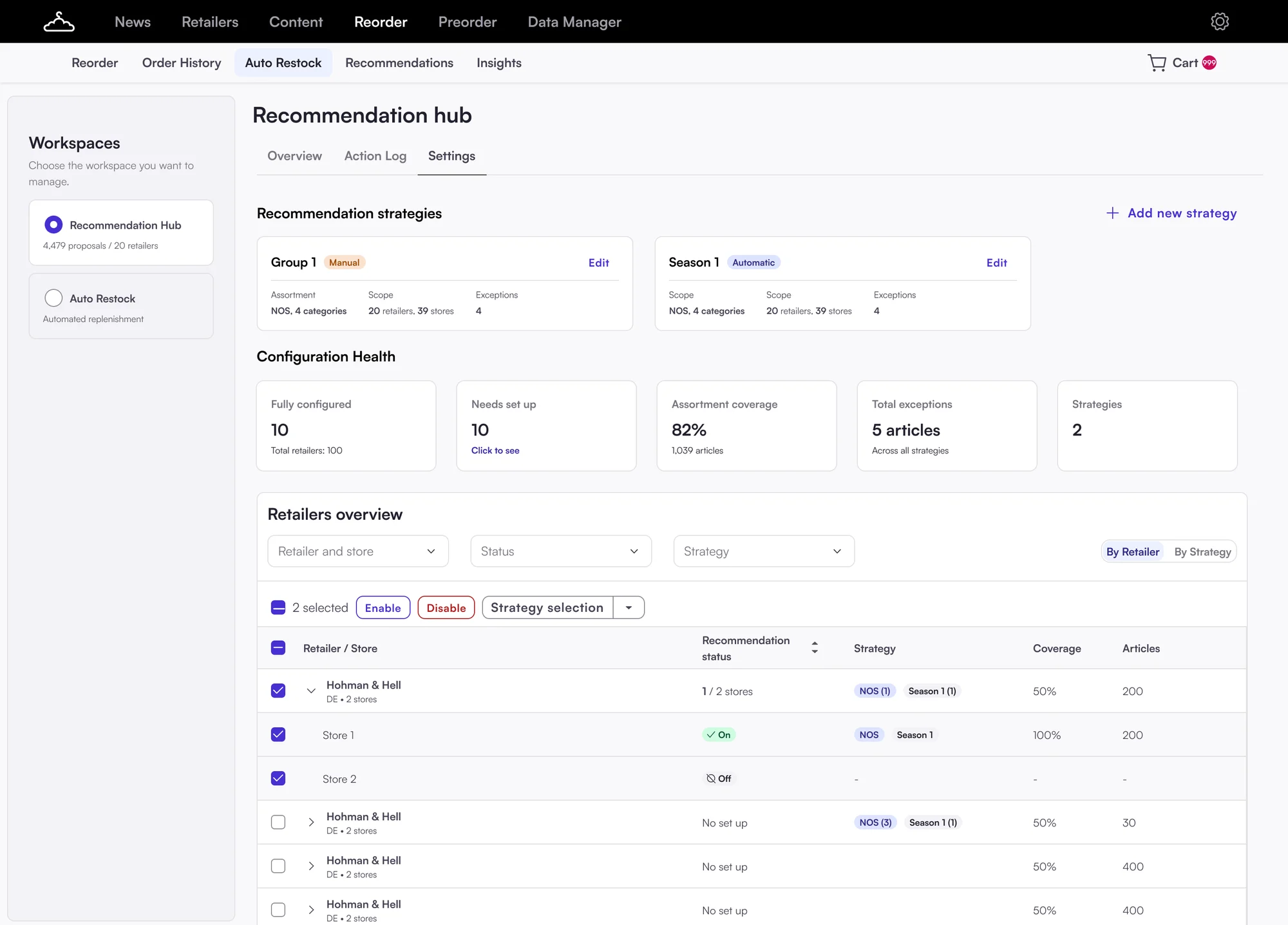
1 · Define once
NOS coreWeekly · Manual review · min 2, max 8
→
2 · Apply
Retailer ARetailer BRetailer CNOS articles
→
3 · Exceptions
Berlin store · Jeansmin 4
Recommendation hub settings with reusable strategies Group 1 and Season 1 and retailers with their strategy

The result. Brands backed strategies. They asked for clearer retailer and article selection.

Decision 3

Make the setup clear

Brands supported reusable strategies, but testing showed that the setup wasn't clear enough.
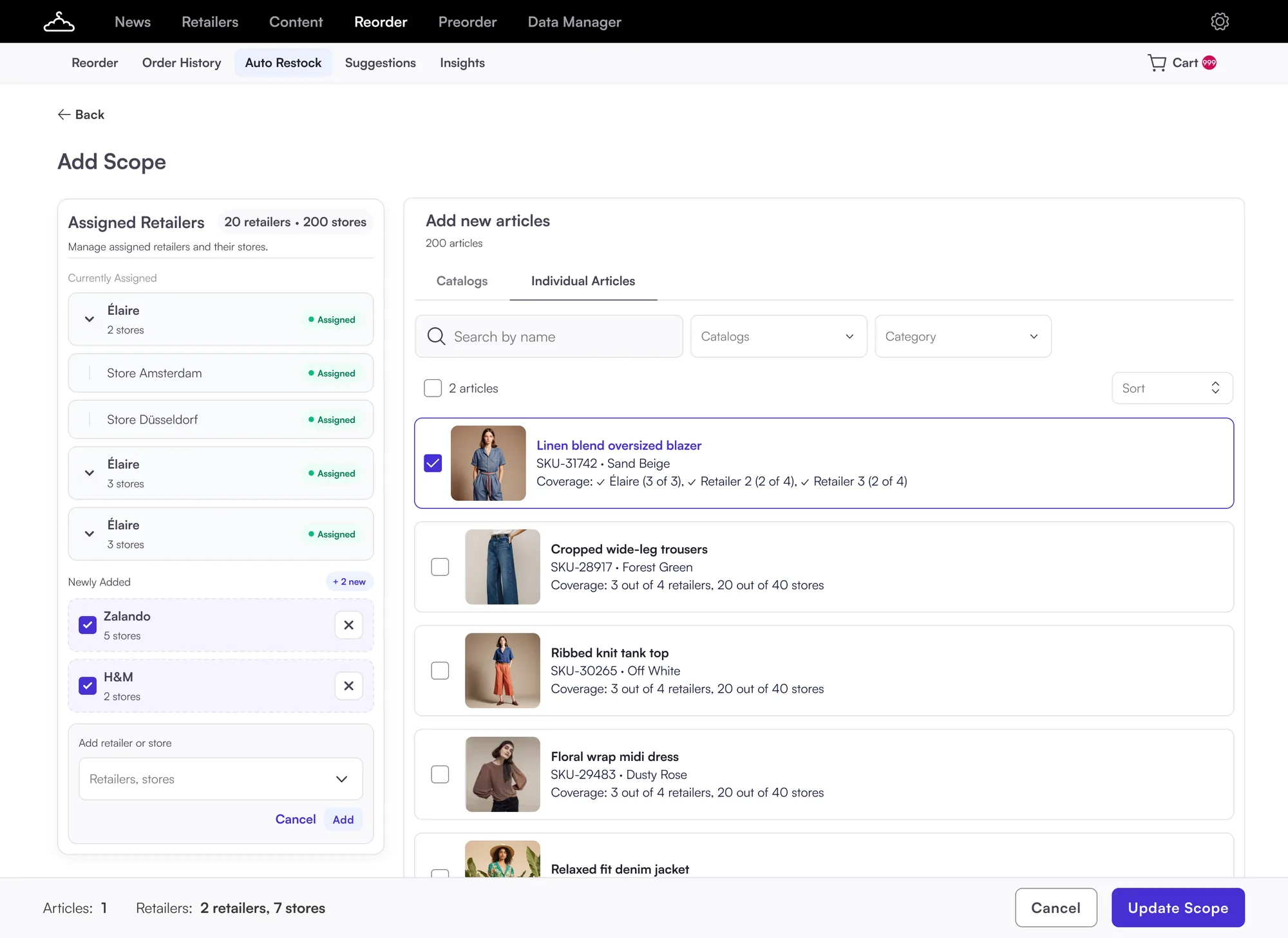
Before
Add Scope page: assigned retailers on the left with a dropdown to add a retailer or store, Zalando and H&M newly added; on the right, Add new articles with catalogs and individual articles picked one by one with checkboxes; Update Scope at the bottom123
Add Scope: one page for everything
  1. Retailers added one by one from a dropdown.
  2. "Add new articles" sounded like adding them to Auto Restock.
  3. Retailers and articles changed at once, then "Update Scope".
After
NewsRetailersContentReorderPreorderData Manager
ReorderOrder HistoryAuto RestockSuggestionsInsights
Recommendation Hub › Settings › Premium Strategy

Add a recommendation strategy

  1. ✓Strategy detailsWeekly, Auto-accepted
  2. 1
  3. 3
  4. 4Review & activate
Retailers

Your Auto Restock retailers and stores. Enable the stores that should get recommendations.

Search by retailer, store nameAll storesEnabledDisabled
5 stores selected EnableDisable
RetailersAvailable articlesStore coverage
⌄Élaire200 across 2 stores2/2 stores
Store Amsterdam200Enabled
Store Düsseldorf200Enabled
⌄Zalando180 across 5 stores3/5 stores
⌄H&M120 across 2 stores0/2 stores
Articles

Articles from your Auto Restock list are shown for the retailers and stores enabled in this strategy. Enable the articles you want to include.

Search by article name, numberCatalogSeasonCategory
2 articles selected Enable recommendation2
ArticlesCategoryStore coverage
Linen blend oversized blazerSKU-31742Blazers5/5 stores
Cropped wide-leg trousersSKU-28917Trousers3/5 stores
Ribbed knit tank topSKU-30265Tops0/5 stores
Floral wrap midi dressSKU-29483Dresses0/5 stores
Summary Premium Strategy | Weekly | Auto-acceptedStores 5 (across 2 retailers)BackNext
Final design: enable, step by step
  1. Every Auto Restock retailer is listed. Enable stores, see coverage.
  2. "Enable recommendations" for articles already in Auto Restock.
  3. Strategy, retailers, articles, review: one step at a time.
Also changed in the strategy details
If nobody reviews in time AutomaticManual review Auto-accepted applied to Auto RestockAuto-declined nothing changes
08 · Final design

The final flow

From the strategy list to a live strategy, after testing with PSMs and brands. Click through the steps.

NewsRetailersContentReorderPreorderData Manager
ReorderOrder HistoryAuto RestockRecommendation HubSuggestionsInsights

Recommendation Hub

+ Add strategy
DashboardStrategies
Find a strategy by nameStatusTypeReview
StrategyStatusScheduleTypeUnreviewedCoverage
Premium StrategyActiveWeekly: Thursday, 09:00Adjust target stockAuto-accepted5 stores · 160 articles
SummerActiveMonthly: first ThursdayAdjust target stock, Stop replenishmentAuto-declined5 stores · 23 articles
WinterInactiveMonthly: first ThursdayAdjust target stockAuto-declined5 stores · 23 articles
NOS coreDraftWeekly: Thursday, 09:00Adjust target stockAuto-acceptedNothing enabled yet
NewsRetailersContentReorderPreorderData Manager
ReorderOrder HistoryAuto RestockRecommendation HubSuggestionsInsights
Recommendation Hub › Strategies › New strategy

Add a recommendation strategy

  1. 1Strategy details
  2. 2Retailers
  3. 3Articles
  4. 4Review & activate

New recommendations every Thursday at 09:00. Review them until Friday 12:00.

Summary Premium Strategy | Weekly | Auto-acceptedStores 5 (across 2 retailers)Articles –CancelBackNext
NewsRetailersContentReorderPreorderData Manager
ReorderOrder HistoryAuto RestockRecommendation HubSuggestionsInsights
Recommendation Hub › Strategies › New strategy

Add a recommendation strategy

  1. ✓Strategy detailsWeekly, Auto-accepted
  2. 2Retailers
  3. 3Articles
  4. 4Review & activate
Retailers and stores

Retailers and stores from your Auto Restock list. Enable the ones you want to include in this strategy.

Search by retailer, store nameAll storesEnabledDisabled
RetailersStatusEnabled storesEnabled articles
⌄ÉlaireEnabled2 / 2160 / 200
Store AmsterdamEnabled160 / 200
Store DüsseldorfEnabled140 / 200
›ZalandoEnabled3 / 5120 / 180
›H&MDisabled0 / 20 / 120
Summary Premium Strategy | Weekly | Auto-acceptedStores 5 (across 2 retailers)Articles –CancelBackNext
NewsRetailersContentReorderPreorderData Manager
ReorderOrder HistoryAuto RestockRecommendation HubSuggestionsInsights
Recommendation Hub › Strategies › New strategy

Add a recommendation strategy

  1. ✓Strategy detailsWeekly, Auto-accepted
  2. ✓Retailers5 stores · 2 retailers
  3. 3Articles
  4. 4Review & activate
Articles

Articles from your Auto Restock list are shown for the retailers and stores enabled in this strategy. Enable the articles you want to include.

Search by article name, numberCatalogSeasonCategory
2 articles selected Enable recommendation
ArticlesCategoryStore coverage
Linen blend oversized blazerSKU-31742Blazers5/5 stores
Cropped wide-leg trousersSKU-28917Trousers3/5 stores
Ribbed knit tank topSKU-30265Tops0/5 stores
Summary Premium Strategy | Weekly | Auto-acceptedStores 5 (across 2 retailers)Articles 160CancelBackNext
NewsRetailersContentReorderPreorderData Manager
ReorderOrder HistoryAuto RestockRecommendation HubSuggestionsInsights
Recommendation Hub › Strategies › New strategy

Add a recommendation strategy

  1. ✓Strategy detailsWeekly, Auto-accepted
  2. ✓Retailers5 stores · 2 retailers
  3. ✓Articles160 articles
  4. 4Review & activate
Review and activate

Check the strategy before recommendations start.

Settings✎

Schedule Weekly: every Thursday, 09:00Unreviewed Auto-acceptedType Adjust target stock

Retailers and stores✎

2/3 retailers 5/9 stores

Articles✎

160/200 articles

Summary Premium Strategy | Weekly | Auto-acceptedStores 5 (across 2 retailers)Articles 160CancelBackActivate strategy
NewsRetailersContentReorderPreorderData Manager
ReorderOrder HistoryAuto RestockRecommendation HubSuggestionsInsights
← Strategies

Premium Strategy Active

⋮
Next run Thursday, 09:00
Settings✎

Schedule Weekly: every Thursday, 09:00Unreviewed Auto-acceptedType Adjust target stock

Retailers and stores✎

2/3 retailers 5/9 stores

Articles✎

160/200 articles

Step 1 of 6Strategy list

Every strategy with its status, schedule, review mode and coverage. Drafts reopen where setup stopped.

Step 2 of 6Strategy details

Name, schedule and type. Runs are fixed: recommendations on Thursday, review until Friday 12:00. Brands choose what happens to anything left unreviewed.

WhyBrands needed it to be clear that unreviewed items change nothing.

Step 3 of 6Retailers and stores

Every Auto Restock retailer is listed, expandable to stores. Stores added later start disabled, so nothing gets recommendations silently.

WhyPSMs couldn't tell if they were setting up Auto Restock or a strategy.

Step 4 of 6Articles

One table with catalog, season and category filters and coverage per store. Only articles already in Auto Restock.

WhyBrands said picking articles one by one felt like work.

Step 5 of 6Review and activate

A read-only summary with exact counts, then a clear confirmation that recommendations are live.

Step 6 of 6Strategy page

An active strategy opens on one overview, not the setup steps again. Edit each part from here.

WhyIn testing, reviewing felt like repeating the whole setup.

09 · Reflection

What I learned

01Align earlier, iterate less

Feedback came late and the MVP kept moving. Next time I'd agree scope with everyone first.

02The real competitor was Excel and Slack

If it's harder than the old way, people won't switch.

03Focus on what happens, not how the system works

Name what happens to recommendations nobody reviews.

Automatic→Auto-acceptManual→Auto-decline